
The trainers getting the most out of ABC Trainerize aren’t all coaching remotely. Many of them are on the gym floor every day, using the app to handle everything the clipboard and the group chat used to: in person training session prep, progress tracking, client communication, and scheduling.
Today’s clients expect more than an hour of good programming. They want to feel supported between sessions, too. ABC Trainerize gives you the tools to deliver that, without adding complexity to how you already work, and without stepping away from the in-person coaching model you’ve built. Here’s how.
#1. Transform Your Training Session on the Floor
During a personal training session, we know it’s important to pay attention to your client’s form to ensure they’re moving safely. Not to mention motivating them through those last few reps that can feel so tough at times.
The problem is that attention doesn’t just split when you’re writing things down. It splits the moment you’re mentally tracking what to log next, where you put the pen, or what weight you used two sets ago. That’s the cognitive load that pulls you out of the session before the clipboard even comes out.
With ABC Trainerize, your client’s workout is already open when they arrive, with sets and exercises in place. Between rounds, you type in the weight. That’s it. The time and mental space you get back goes toward watching form, counting reps, and being present with the person in front of you.
What your notes are actually for
Workout Notes are private to you and tied to each individual session. You can use them to log anything the client doesn’t need to see: they came in sleep-deprived, their left knee is acting up again, you need to dial back the load next week.
Go to the Progress tab, select “Review by Workout,” and every note surfaces in one place when you’re building the next program.
Feature highlight: Exercise Notes
Exercise Notes let you attach specific guidance directly to individual exercises. A cue for elbow flare on a press, a weight progression flag, a form reminder tied to a previous injury. The note travels with the exercise, so context is right there when you need it, without digging through a separate document or relying on memory.
#2. Build Smarter Programs, Faster
If you’ve been training long enough, you’ve written the same beginner program more times than you can count. Different clients, same foundation: learn to squat, deadlift, push, and pull.
With the Master Programs library within ABC Trainerize, you build that program once. One template, fully customizable, copied into any new client’s profile in seconds. After the initial consultation, you edit based on their goals, injury history, and preferences.
And on the floor that day, if a rack is taken or a piece of equipment isn’t available, for example, you can swap the exercise on the spot. The program bends to the session, not the other way around.
That’s already a significant upgrade from paper, but here’s where it goes further.
You can now use our AI Workout Builder to generate a complete, structured program in minutes from a prompt or directly from your client’s profile data, pulling in their training history, equipment access, and goals.
The output is fully editable before you assign it, and you never leave the platform. No copy-pasting, no switching tools, no starting from scratch. Our trainers are reporting up to 75% less time spent on programming, which is hours back in your week across a full roster.
Introducing the AI Workout Builder ✨
If you’d rather start with something ready-made, ABC Trainerize Collections gives you professionally built exercises and complete programs across every category, barbell, mobility, machine, yoga, Pilates, and more, ready to drop straight into any client’s plan.
Check Out: Using AI as a Personal Trainer
#3. Stay Connected Before, During, and After Sessions
If you’ve ever worked a 5 or 6 am session, you’ve probably had a no-show more than once. The client gets charged, the front desk handles the fallout, and you’ve just lost an hour you could have used.
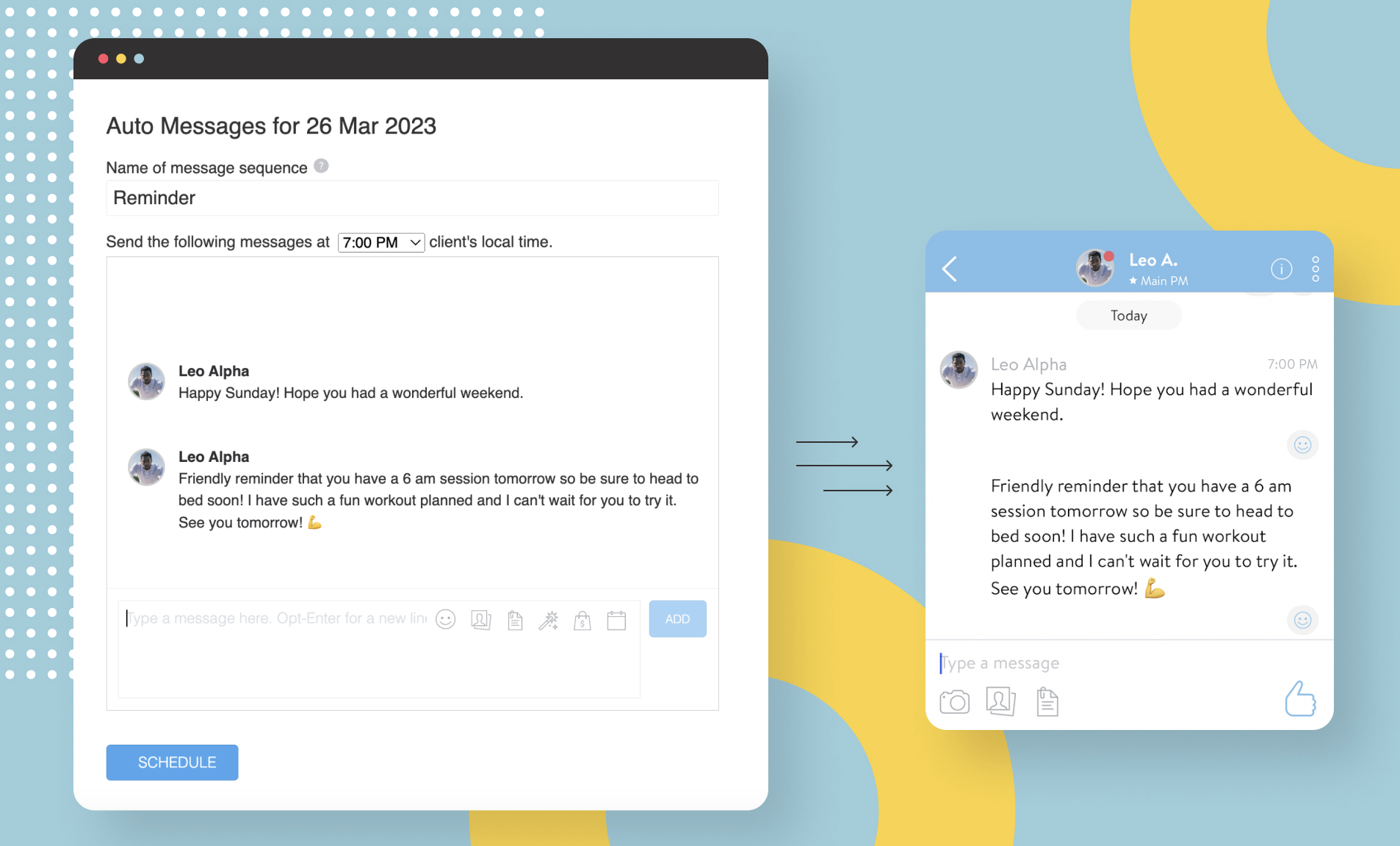
Auto-messages don’t eliminate every no-show, but a well-timed personal reminder from their trainer lands very differently than a generic email notification, which most clients have unsubscribed from or filtered to trash anyway.
On your end, these messages are pre-scheduled and visible in the calendar. On the client’s end, they arrive as a thoughtful message from you. And you are thoughtful. Just because you’re working smart behind the scenes, doesn’t mean you care any less.
Here is an example of auto messages that can be scheduled before a workout:
Pro Tip: Make the follow-up part of your system
The trigger options go well beyond session reminders. You can schedule messages around a client’s first completed workout, a birthday, hitting a nutrition goal, reaching a weight milestone, or the final week of a program.
That last one is where a well-placed upsell or referral prompt lands most naturally, when the client has just completed something and the momentum is real. None of this requires you to remember to send anything.
You write the message once, set the trigger, and it goes out at the right moment in the client’s local time.
Feature highlight: Check-In Forms
Auto-messages keep the connection alive between sessions, but they’re one-directional.
Check-In Forms close that loop.
Your clients can complete structured weekly or monthly check-ins directly in the app, covering sleep quality, nutrition adherence, energy levels, and progress toward goals. You review responses in the Check-In tab or Recent Activities dashboard, so by the time they walk in for their next session, you already know how their week went.
For in-person trainers especially, that context changes the quality of the session before it starts.
Read More: AI for Client Check-Ins: Automate Without Losing the Personal Touch
#4. Manage Bookings Without the Back-and-Forth
Scheduling the next session is one of the easiest things to let slip through the cracks. The session ends, the client heads out, and the back-and-forth of finding a time starts over by text or phone later that day.
With client self-booking within ABC Trainerize, clients can book their next session directly in the app, including right at the end of a current session while they’re still standing in front of you. The time is locked in before they walk out the door. No phone tag, no admin, no following up two days later.
These features are the most basic yet crucial when it comes to personal training in 2026 and beyond.
#5. Track Progress Without the Paperwork
Paper logs and spreadsheets work until they don’t: a missed entry, a misplaced sheet, or a client who can’t remember what they lifted three weeks ago. There’s really no need to do it that way anymore.
With ABC Trainerize, body stats and progress photos are logged directly in the app and stored in the Progress tab, giving both you and your client a clear, continuous record of how things are changing between sessions. This is what you get with proper tech support.
But what makes the Progress tab genuinely useful for in-person coaching is what it consolidates. Body stats and progress photos, workout notes, and check-in form submissions all live in one place.
Even before your client arrives, you can pull up everything that matters about where they are right now, without opening a second tool or asking them to recap their week from memory.
#6. More Product Options, More Revenue Streams
Although most of your coaching may happen in person, training in 2026 has to follow digitally as well. That means having digital options that give your clients more ways to stay connected to your services.
For example, you’ve probably had someone say they can’t afford one-on-one coaching right now, or they simply don’t have time to come into the gym multiple times per week. Instead of losing that lead entirely, you can offer lower-commitment products through ABC Trainerize.
That could be:
- A self-guided training program
- An on-demand workout library
- Follow-along video workouts
- A hybrid membership with both in-person and app-based support
With ABC Trainerize, you can upload and deliver full-length on-demand video workouts directly through the app, making it easier to sell coaching beyond live sessions. Trainers can package video workouts, memberships, and recurring subscriptions into additional revenue streams that clients can access anytime.
Check Out: The Simplest Way to Upsell Nutrition Coaching to Personal Training Clients
And while these products may sit at a lower price point than full personal training, they often become an entry point into higher-ticket coaching later on, too.
Instead of disappearing after saying “not yet,” clients stay connected to your ecosystem. You can continue nurturing them through workouts, habits, messages, and content until they’re ready for more support.
Prior to using ABC Trainerize, many trainers would lose those leads completely. Now, even if a client isn’t ready for full coaching today, there’s still a way to keep delivering value in the meantime.
Check Out: 7 Secondary Revenue Streams To Boost Business
There’s More Than One Way to Be a Trainer
If you currently train clients in person and want to start exploring online coaching, there’s no need to completely reinvent your business overnight.
In fact, many trainers find that a hybrid model works best. You continue working with in-person clients while layering in digital coaching, app-based workouts, video check-ins, or on-demand programs alongside your live sessions.
For example:
- Clients may train with you once per week in person while completing additional workouts through the app
- You might offer a lower-cost subscription with self-guided programming and monthly check-ins
- Or you may combine in person coaching with habit tracking, messaging, and progress reviews between sessions
The flexibility allows you to build a coaching model that fits both your clients’ schedules and your own.
For a deeper look at this approach, read: Hybrid Personal Training: The Best of Both Worlds for Clients and Trainers.
ABC Trainerize helps connect all of these experiences in one place, so whether clients are training with you on the gym floor or inside the app, everything feels connected.
For trainers looking to create a more premium client experience, the ABC Trainerize Custom Branded App takes this a step further by bringing both the in-person and digital sides of the business together under your own brand.
Free Resource: A Complete Guide to Purchasing Your Custom Branded Fitness App
“As soon as we implemented the Trainerize app within our clubs, it allowed all of our coaches to communicate with all of our clients and all of our other trainers, which means we were providing a consistent customer experience—which is very difficult to do at scale and at volume, but we have been able to do that, and Trainerize has been a perfect tool for that.“
– Alloy Fitness CEO, Rick Mayo
Many trainers also use digital tools and education resources as part of their ongoing professional development, helping them improve programming, communication, and client retention over time.
Read More: Ultimate Guide to Online Personal Training: Coaching, Packages, and Success Tips
FAQs
What is in-person coaching?
In person coaching is face-to-face personal training where the coach guides workouts live, adjusts form in real time, and delivers hands-on accountability and support during each session.
How do personal trainers use apps during in-person sessions?
Many trainers use apps to keep workouts open during sessions, log weights between sets, track progress live, review workout history, and make programming adjustments without relying on paper notes or memory.
What’s the effectiveness of virtual fitness coaches vs in-person coaches?
Both models can be highly effective, but they support clients differently. In-person coaches provide live feedback, form correction, and face-to-face accountability, while virtual coaching offers more flexibility, accessibility, and ongoing support between sessions. Many trainers now combine both through a hybrid coaching model.
What is the best app for managing in-person personal training clients?
The best apps help trainers manage workouts, progress tracking, communication, scheduling, and client notes in one place. ABC Trainerize is widely used by trainers running both in-person and hybrid coaching businesses.
Can ABC Trainerize be used for in-person training, not just online coaching?
Yes. While many trainers use ABC Trainerize for online coaching, it’s also built to support in person training sessions through live workout tracking, exercise notes, progress reviews, messaging, and session management.
How do I track client progress during in-person sessions with an app?
Using your own personal training branded app you can log weights, reps, exercise performance, and workout notes during the session. Over time, this creates a detailed workout history that makes progression and future programming easier to manage.
Conclusion
The future of personal training is no longer strictly online or strictly in person. The most successful trainers are combining both to create flexible, connected coaching experiences that fit how clients actually live today.
According to the 2026 State of the Personal Training Industry Report, hybrid coaching has become the dominant model, with clients expecting more personalization, flexibility, accountability, and ongoing support.
Whether you’re delivering workouts on the gym floor, selling digital programs, offering on-demand video content, or building a hybrid coaching business, ABC Trainerize helps bring everything together in one place.
From session tracking and client communication to program delivery and retention, it supports trainers at every stage of growth. Start your free trial today and build a coaching business designed for where the industry is headed next. Try it Now